

 Shimul Chowdhury
Steps to Secure, Speed, and Scale Your Site
We’ve all been there: staring at a slow-loading website, a flurry of error messages, or worse, a “This site has been hacked” warning. When a business experiences a significant setback, it can feel devastating and completely disrupt operations. But what if there was a way to prevent these digital disasters before they even happen?
In 2024, an alarming 90% of hacked websites were WordPress sites according to research from security firms like Sucuri and Wordfence. This isn’t because the platform is inherently insecure; it’s because many site owners neglect the regular, critical upkeep that keeps their websites safe, fast, and profitable. From outdated plugins creating security holes to bloated databases killing performance, these common pain points can silently erode your user trust and revenue.
This is where a proactive WordPress maintenance checklist becomes your most valuable asset. This isn’t just a simple list of tasks; it’s your strategic plan for digital peace of mind. We’ve compiled the definitive Zeireed WordPress Maintenance Checklist for 2025 to give you a clear roadmap to a more secure, faster, and more scalable website. Follow along, and you’ll learn how to transform a source of worry into a well-oiled machine.
Why Your WordPress Site Needs a Critical 2025 Maintenance Plan
In today’s digital landscape, a website is more than just an online brochure; it’s a living entity that requires consistent care. Neglecting it isn’t just risky—it’s financially irresponsible. Understanding the evolving threats and what Google now prioritizes is essential. A truly effective WordPress maintenance checklist starts with understanding the “why” behind each action.
The Ever-Evolving Threat Landscape
Hackers and malicious bots are constantly evolving their tactics. Keeping your core WordPress files updated is no longer a complete solution. Every plugin, theme, and line of code is a potential entry point for a security breach. Regular security audits, proactive monitoring, and instant patch updates are no longer optional—they’re the bare minimum. Neglecting these tasks is like leaving your front door unlocked in a crowded city. A simple misconfiguration or an outdated plugin can open a door that allows a hacker to inject malicious code, steal customer data, or turn your site into a botnet. This is why a thorough WordPress maintenance checklist must be your first line of defense.
My personal experience with a client’s e-commerce site several years ago is a perfect example. They were running a successful WooCommerce store but hadn’t performed a WordPress security scan in months. A seemingly innocent, outdated plugin had a known vulnerability. A hacker exploited it, injected malicious code that redirected customers to a phishing site, and the client lost over $5,000 in sales in less than 12 hours. The damage to their brand reputation was even worse. A simple, professional WordPress maintenance checklist could have prevented it entirely.
Google’s Focus on User Experience
Since the Google Hummingbird update in 2013, search engines have moved toward understanding the true meaning and intent behind a user’s search query, relying on semantic entities and the Knowledge Graph. This focus on “understanding” has evolved further in 2025 with an even greater emphasis on user experience (UX). Google’s Core Web Vitals—metrics like Largest Contentful Paint (LCP), First Input Delay (FID), and Cumulative Layout Shift (CLS)—are now critical ranking factors. A slow, janky website won’t just frustrate visitors; it will actively hurt your SEO. A well-maintained site is a fast site, which is a key signal to Google that your content is high-quality and worth showing to users. As a study from the Harvard Business Review found, companies that prioritize a great user experience see an average revenue increase of 21%. This makes every single point on our WordPress maintenance checklist a direct contributor to your bottom line.
The Financial Cost of Neglect
Think about your website as a physical storefront. Would you let the doors get rusty, the lights flicker, and the floors become a minefield of broken glass? Of course not. A poorly maintained website is a digital version of this. Downtime, security breaches, and poor performance can lead to tangible losses. A single hour of downtime for an e-commerce site can cost thousands of dollars in lost sales and customer trust. A security breach can lead to fines, lawsuits, and irreversible damage to your brand’s reputation. A professional WordPress maintenance plan is a smart investment that protects your business’s financial stability and future. According to a study by Forbes, small businesses lose an average of $120,000 per year due to IT downtime, a significant portion of which is caused by website issues. A complete WordPress maintenance checklist helps you avoid these costly events.
The Zeireed 11-Point WordPress Maintenance Checklist
This is the definitive guide to keeping your WordPress site in peak condition. These steps are all essential components of a thorough maintenance plan.
Step 1: Secure Your Login (The First Line of Defense)
The login page is the most common target for brute-force attacks.
- Boost your security by replacing the standard
/wp-adminlogin URL with a unique, custom URL that is much harder for others to discover. This simple step immediately makes your site invisible to many automated bots.
- Enforce strong, unique passwords for all user accounts, especially for administrators. A long, random passphrase is far more secure than a memorable word.
- Implement two-factor authentication (2FA). This process requires users to provide a second form of verification—such as a code sent to their phone—after entering their password. It’s an excellent way to prevent unauthorized access. This is the first critical point on any effective WordPress maintenance checklist.
Step 2: Automated & Redundant Backups
Backups are your insurance policy. A single point of failure—whether it’s a server crash or a malicious attack—can wipe out years of work.
- Schedule automated backups of your complete site (files and database) to run at a minimum of once a day. For high-traffic websites, a more frequent schedule, such as hourly backups, may be necessary.
- Use a redundant strategy: store your backups in multiple off-site locations, such as a cloud storage service like Amazon S3 or Google Drive. Relying solely on your web host’s backups can be risky if their servers fail.
- Pro Tip: Your web host may offer backups, but you should also run your own via a plugin for full control. This ensures you can access your data even if your hosting provider is having issues. Having a solid WordPress maintenance checklist for backups is non-negotiable.
Step 3: Timely Plugin and Theme Updates
Outdated software is the top reason for security vulnerabilities in WordPress. Developers release updates to fix bugs, add features, and, most importantly, patch security holes. This is a key item on any WordPress maintenance checklist.
- Make sure you consistently check for and apply any updates available for your plugins and themes.
- Before updating, always run a full backup. A plugin update could conflict with your theme or another plugin, causing your site to break. Having a recent backup allows for a quick rollback.
- Pro Tip: Automate updates for trusted, well-maintained plugins, but manually handle major themes or complex plugins to avoid conflicts. It’s a balance of convenience and caution, as any WordPress maintenance checklist will tell you.
Step 4: Proactive Security Scanning
Just like a virus scan on your computer, a security scan of your website can detect malicious code and vulnerabilities before they cause harm. This is an essential part of any modern WordPress maintenance checklist.
- Run a full scan of your WordPress site for malware, backdoors, and other security threats.
- Use a security plugin or a service that monitors file integrity for unauthorized changes. These tools can compare your current files to their clean versions and alert you to any suspicious modifications.
- I have a personal story about a client who had a website that seemed spotless. A routine security scan by our team revealed a single line of malicious code hidden in a core WordPress file. It was designed to slowly siphon off user data over time. Without that proactive scan—a standard part of a professional WordPress maintenance checklist—the client would have never known about the breach until it was too late.
Step 5: Database Optimization
As time passes, your database can fill up with spam comments, old post revisions, and leftover data from plugins you’ve uninstalled. This bloat slows down your site. This step is often overlooked on a basic WordPress maintenance checklist.
- To remove unnecessary data, regularly clean your database. This can be done either with a dedicated plugin or manually through PHPMyAdmin.
- Optimize database tables to improve query speed. This reorganizes the database to make it more efficient. A streamlined database is a key factor for a fast website, and an essential part of a comprehensive WordPress maintenance checklist.
Step 6: Speed & Performance Audits
A quick website is non-negotiable for improving both user experience and search engine optimization. A thorough WordPress maintenance checklist goes beyond simple checks and into performance.
- Run regular audits using tools like Google PageSpeed Insights and GTmetrix to identify performance bottlenecks. These tools will give you a list of actionable steps to improve your site speed.
- Focus on optimizing your images, minifying CSS and JavaScript files, and leveraging browser caching.
- Pro Tip: A Content Delivery Network (CDN) can drastically improve your site’s speed for visitors around the world by serving static files from a nearby server. This is a crucial step for any business with a global audience, and a mark of a professional WordPress maintenance checklist.
Step 7: Fix Broken Links
Broken links frustrate users and can hurt your SEO. They signal to search engines that your site is unmaintained or of low quality. This is an integral part of an effective WordPress maintenance checklist.
- Use a broken link checker to find and fix or remove any dead links.
- FAQs: Do broken links affect SEO? Yes, they do. A large number of broken links can be a red flag for search engines, which may harm your site’s crawlability and authority. A broken link can also be a missed opportunity to pass authority to another page on your site.
Step 8: Regular Uptime Monitoring
Your site could go down at any time due to server issues, a cyberattack, or a plugin conflict. This is a passive but vital step on any WordPress maintenance checklist.
- Use a service to monitor your site 24/7 and alert you immediately via email or SMS if it goes offline.
- Prompt detection allows you to resolve issues quickly, minimizing downtime and lost revenue. In the world of e-commerce, a few minutes of downtime can cost hundreds, if not thousands, of dollars.
Step 9: Comment and Spam Management
Spam comments can be a source of malware and low-quality links that harm your SEO. This is an often-overlooked but essential item on any WordPress maintenance checklist.
- Regularly moderate comments and delete any that are spam or malicious.
- Use an anti-spam plugin to automatically filter out a majority of junk comments.
Step 10: Server and PHP Version Updates
Your WordPress website operates on a server that uses the PHP programming language. Outdated PHP versions can pose serious security risks and performance limitations. This is a technical but necessary part of a complete WordPress maintenance checklist.
- Ensure your server is running a recent, supported version of PHP.
Step 11: Content and SEO Health Check
While technical maintenance is vital, the health of your content is equally important. This final step on the WordPress maintenance checklist ties everything together.
- Check for thin content, duplicate content, and orphaned pages that are not linked to from anywhere else on your site.
- Ensure your internal linking structure is robust and organized. Internal linking is crucial for helping both users and search engines find their way around your site and grasp how your different pieces of content relate. According to a Moz study, a well-executed internal linking strategy can lead to a considerable improvement in page rankings.
The E-E-A-T+ Advantage: Building Trust and Authority
In 2025, Google’s search quality raters are now looking for E-E-A-T+ (Experience, Expertise, Authoritativeness, Trustworthiness, and Engagement). A well-maintained site is the foundation of this framework. This is the new standard for a truly helpful and high-ranking WordPress maintenance checklist.
- Experience: A fast, seamless website delivers an excellent user experience that holds visitors’ attention. It’s the digital equivalent of a clean, well-lit store.
- Expertise: By providing a detailed WordPress maintenance checklist like this one, you demonstrate a deep understanding of the platform. The team at Zeireed, including experts like Showhan Ahmed, Nazmus Sakib, Mehedi Hasan and Shimul CH, brings years of hands-on experience to the table, solving complex problems daily.
- Authoritativeness: A secure, fast-loading site with no broken links is seen as an authoritative source in its niche. When your site runs flawlessly, it signals to both users and search engines that you are a reliable, authoritative source of information.
- Trustworthiness: A site that is free of security vulnerabilities and downtime builds trust with both users and search engines.According to a recent survey by PwC, 87% of consumers are willing to switch to another company if they don’t trust how their data is handled.
- Engagement: When users can easily navigate a fast, secure site, they stay longer and interact more, sending a powerful signal to Google. This increase in dwell time and decrease in bounce rate are key metrics that Google rewards with higher SEO rankings.
The DIY vs. Professional Maintenance Debate
Now that you have the WordPress maintenance checklist, you face a critical decision: should you handle these tasks yourself, or hire a professional?
The DIY Approach: Pros and Cons
- Pros: You have full control, and it’s seemingly free (if you don’t count your time).
- Cons: The learning curve is steep. One wrong move—like updating a plugin without a backup—can crash your entire site. You also have to stay on top of the latest security threats and WordPress updates, a full-time job in itself. Your time is a business owner’s most valuable asset. The time you spend on maintenance is time you’re not spending on sales, marketing, or client relations. This is why a full WordPress maintenance checklist can feel overwhelming.
The Professional Approach: The Zeireed Advantage
Hiring a professional team like Zeireed is about more than just convenience. It’s a strategic business decision.
- Expertise on Demand: The Zeireed team has dedicated professionals who live and breathe WordPress. They have seen every problem imaginable and know how to fix them quickly and efficiently. Our comprehensive WordPress maintenance checklist is a service, not just a guide.
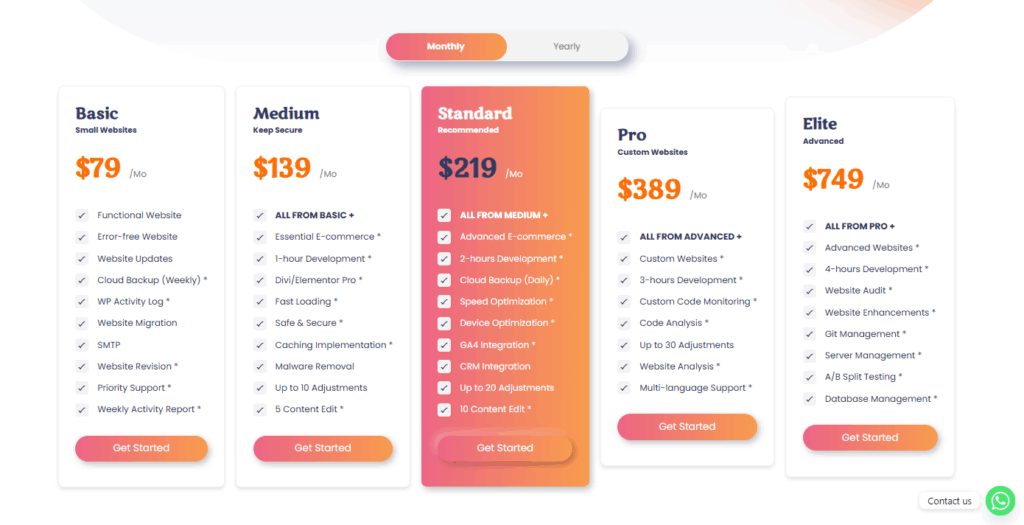
- Peace of Mind: You get a single, monthly fee that covers everything from security monitoring to backups and updates. You never have to worry about your site crashing in the middle of the night. This is the core benefit of a professional WordPress maintenance plan.
- Proactive, Not Reactive: A professional service is proactive. We don’t just fix problems; we prevent them from happening in the first place. This includes setting up automated systems and staying ahead of security threats, all of which are covered by our WordPress maintenance checklist.
- Access to Premium Tools: Professional maintenance plans often include access to premium plugins and services for backups, security, and performance that would be expensive to purchase individually. This is a significant advantage over a DIY WordPress maintenance checklist.
A recent study by Forrester Consulting, commissioned by a B2B software company, found that 92% of business leaders believe that professional services are crucial for business success. This isn’t just a trend; it’s a proven strategy for growth and stability, and it all starts with a well-defined WordPress maintenance checklist.