


Key takeaways
- Judge a Webflow developer on live work, CMS structure, SEO and migration skill, and ownership terms.
- Webflow’s Foundations tier is opt-in. Webflow says its Certified partners have been vetted, so check which badge you are looking at.
- The site should sit in your Webflow Workspace, with the site plan billed to you. Webflow has supported moving sites to a client’s Workspace with zero downtime since August 2025.
- Any migration needs a URL-by-URL 301 redirect map. Google advises keeping redirects for at least a year.
To choose a Webflow developer, judge the evidence they can show you, not the claims they make. Look at live Webflow sites like yours, a CMS structure your team can extend, a plan for SEO and redirects, and a contract that puts the finished site in your own Webflow Workspace. A partner badge helps, but it is no longer proof on its own. Since 28 April 2026, freelancers and agencies building on Webflow can join the entry tier of its partner program, Foundations, simply by opting in (Webflow, retrieved 2026-11-04).
This guide gives you 10 checks, each with a way to verify it. It also covers 15 questions for the first call, the red flags that should end a conversation, and how pricing works.
Key Takeaways
- Judge a Webflow developer on live work, CMS structure, SEO and migration skill, and ownership terms.
- Webflow’s Foundations tier is opt-in. Webflow says its Certified partners have been vetted, so check which badge you are looking at.
- The site should sit in your Webflow Workspace, with the site plan billed to you. Webflow has supported moving sites to a client’s Workspace with zero downtime since August 2025.
- Any migration needs a URL-by-URL 301 redirect map. Google advises keeping redirects for at least a year.
In this guide: freelancer, agency or in-house · what to prepare · the 10-point checklist · 15 questions for the first call · red flags · B2B and enterprise checks · pricing · FAQ
Should you hire a Webflow freelancer, an agency or an in-house developer?
A freelancer suits a well-defined marketing site. An agency suits projects that combine design, development, SEO and migration. An in-house developer pays off only when you have a steady flow of Webflow work.
| Freelancer | Agency | In-house developer | |
| Cost basis | Hourly or fixed per project | Fixed scope, phased or retainer | Salary plus benefits and tools |
| Typical engagement | One build or ongoing small changes | Full build, migration or redesign | Continuous site work |
| Design, development and SEO coverage | Usually one or two of the three | All three in one team | Depends on the hire |
| Risk if the person leaves | High | Low | Medium; knowledge leaves with them |
| Best for | Defined scope, smaller budget | B2B and enterprise sites, migrations | Teams shipping pages every week |
For a cost benchmark, US web developers earned a median of $92,650 a year in May 2025, according to the US Bureau of Labor Statistics (retrieved 2026-11-04). That figure covers web developers alone, not digital designers, and it is salary only, before benefits, tools and management time.
For B2B teams, the choice is rarely an agency or in-house. A common setup is an agency that builds the structure and a marketer in-house who publishes through Webflow. If you go that way, choose the agency on how well it hands work over (checks 4 and 5 below).
What should you prepare before contacting developers?
Write a one-page scope before you contact anyone. Without it, quotes can’t be compared. Include:
- The pages and page templates you need
- CMS content types, such as blog posts, case studies, team members or resources
- Integrations, such as your CRM, analytics and form tools
- Whether you are migrating from another platform, and how many URLs you have
- Who will edit the site after launch
- Your deadline and budget range
Send the same scope to every candidate. Their questions about it are your first quality signal.
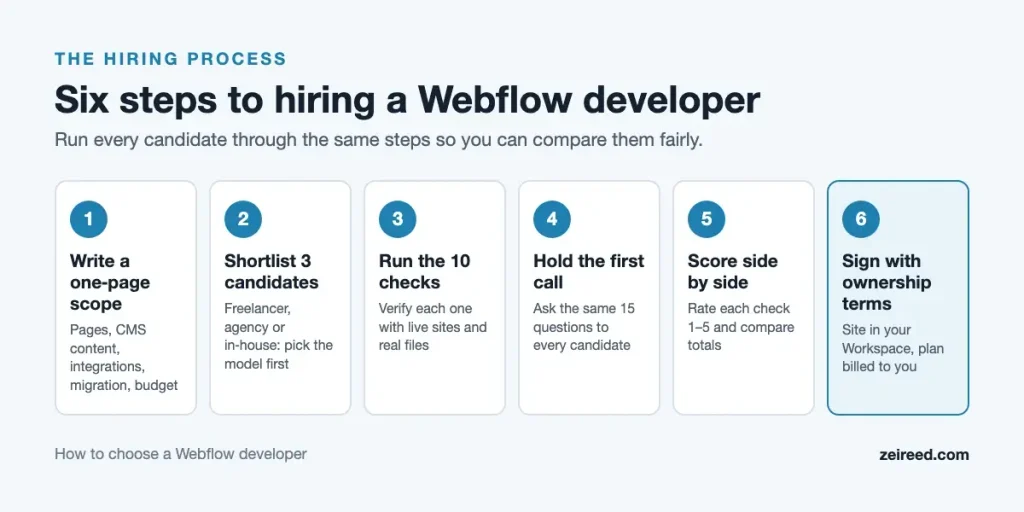
The hiring process at a glance.
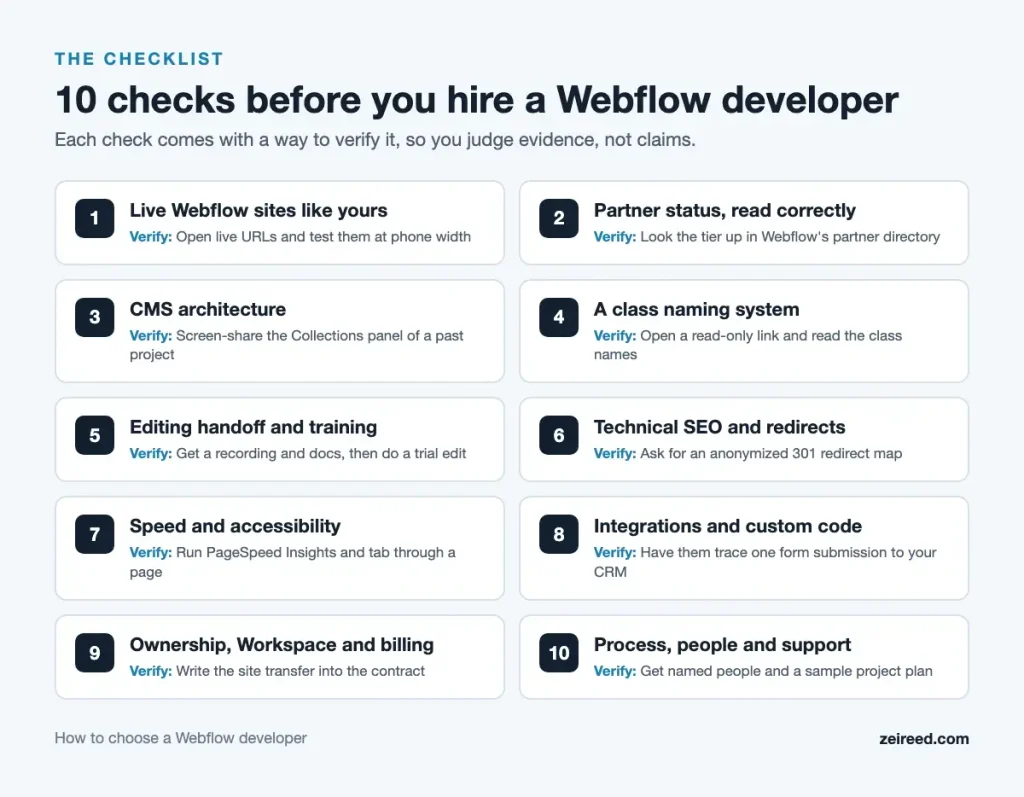
The 10-point Webflow developer checklist
Each check below ends with a way to verify it, so you can test what a developer tells you.
Live Webflow sites like yours
Mockups and design files show taste, not how well someone builds. Ask for live URLs of Webflow sites similar to yours in size, industry or CMS complexity.
How to verify: Open each site and confirm it runs on Webflow; the page source references Webflow assets. Resize the browser to phone width and click through the navigation. Ask which parts the developer built personally and which were done by someone else.
Partner status, and what each badge means
Webflow’s partner program has three tiers. Foundations launched on 28 April 2026 as the entry point, and freelancers and agencies join by opting in (Webflow blog, retrieved 2026-11-04). Certified requires an active Freelancer or Agency Workspace plan, a pre-qualification assessment, and three client sites built from scratch that are graded against a rubric. The Premium partner tier sits above Certified (Webflow Partner Program, retrieved 2026-11-04). Enterprise is a separate badge for partners at Certified tier or above who have completed enterprise training and closed Enterprise clients (Webflow Enterprise distinction, retrieved 2026-11-04).
How to verify: Look the candidate up in the Webflow Certified Partners directory and note the tier. Webflow states that its Certified partners have been vetted. Treat any badge as one signal among ten. Many capable developers have none.
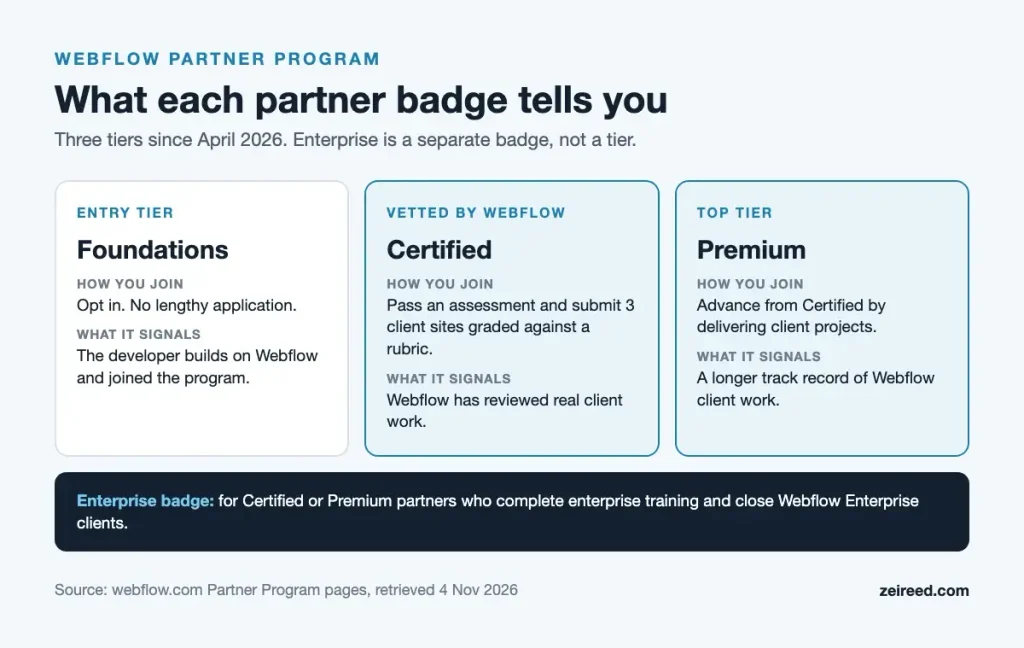
Webflow’s partner tiers and what each badge signals. Source: webflow.com, retrieved 4 Nov 2026.
CMS architecture that fits your plan
The Webflow CMS stores repeating content in Collections linked by reference fields. A good structure lets your team add a case study or author without touching the design. Plan limits matter too. Since May 2026, Webflow’s Premium site plan, which replaced the CMS and Business plans, includes 20,000 CMS items and 40 Collections (Webflow, retrieved 2026-11-04).
How to verify: Ask for a screen-share of the Collections panel on a past project. Ask how they would model your content types and which plan your site will need.
A class naming system the next developer can follow
Webflow styles are built from classes. Without a naming convention, a site becomes hard to change after a year. Look for a documented system, such as Client-First or the developer’s own, plus a style guide page and reusable components.
How to verify: Ask for a read-only link to a past project. Open a page and check whether the class names describe what they do.
Editing handoff and training
Your team edits Webflow through paid seats. The Limited seat costs $15 a month, billed yearly, and lets people edit content or build pages with components (Webflow pricing, retrieved 2026-11-04). A good handoff means your marketers can publish without breaking a layout.
How to verify: Ask for a recorded walkthrough and written docs. Before launch, have someone on your team publish a test post on the staging site.
Technical SEO and a redirect plan
SEO in Webflow means meta titles and descriptions bound to CMS fields, schema, a sitemap and clean URLs. For a migration, it also means a 301 redirect for every URL that changes. Google recommends permanent redirects and keeping them in place for “generally at least 1 year” (Google Search Central, retrieved 2026-11-04).
How to verify: Ask for an anonymized redirect map from a past migration. Ask how they would benchmark your rankings before launch.
Speed and accessibility you can test
Speed and accessibility are measurable, so you can check them on a developer’s past work. Google’s Core Web Vitals count as “good” at these thresholds: Largest Contentful Paint of 2.5 seconds or less, Interaction to Next Paint of 200 milliseconds or less, and Cumulative Layout Shift of 0.1 or less. They are measured at the 75th percentile of page loads (web.dev, retrieved 2026-11-04). For accessibility, the current standard is WCAG 2.2, last updated by the W3C in December 2024 (W3C, retrieved 2026-11-04).
How to verify: Run PageSpeed Insights on two of their live sites. Then tab through a page with your keyboard and check that every link and button is reachable and visibly focused.
Integrations and custom code
Most B2B sites send form leads to a CRM and load analytics and tag managers. Ask which tools they have connected before and where any custom code lives.
How to verify: Ask them to explain step by step how a form submission on your site would reach your CRM. Then ask what happens when a third-party script breaks.
Ownership, Workspace and billing
The finished site should sit in your Webflow Workspace, with the site plan billed to your card and the design files and assets yours under the contract. Since 28 August 2025, Webflow has let agencies transfer sites with active plans to a client’s Workspace with zero downtime, and billing moves to the client (Webflow, retrieved 2026-11-04).
How to verify: Put the transfer and ownership terms in the contract. Ask whether they will use Webflow’s site transfer at launch.
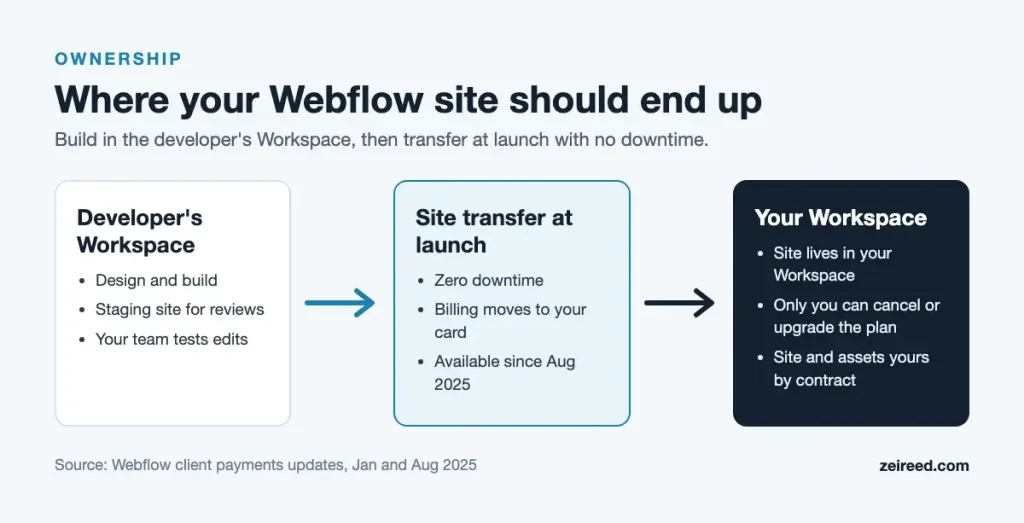
Build in the developer’s Workspace, then transfer the site to yours at launch.
Process, people and support after launch
Know who designs, who builds and whether any work is subcontracted. Ask for milestones, a review or staging link during the build, response times, and what maintenance costs after launch.
How to verify: Ask for the names of the people on your project and a sample project plan from a past build.
What questions should you ask a Webflow developer in the first call?
Good answers are specific and come with something you can see. Use these 15 questions, grouped by topic.
Scope and process
- What would you need from us to give a fixed quote? A good answer lists specific inputs, such as a sitemap, content types and integrations.
- Will we approve a design or prototype before the build starts? Look for a clear approval step.
- Who will work on our project, and is any of it subcontracted? Names, not “the team”.
- How do we review progress during the build? A staging or review link, with set check-ins.
Technical
- Which Webflow plan will our site need after the May 2026 plan changes, and why? They should know that Premium replaced the CMS and Business plans.
- How would you structure our CMS Collections? Should map to the content types in your scope.
- Which class naming system do you use? A named, documented system.
- How do you handle Core Web Vitals and image optimization? Specific techniques, ideally with scores from past sites.
- How will our forms connect to our CRM? A concrete method and tool.
Ownership and handoff
- Will you transfer the site to our Workspace using Webflow’s site transfer at launch? Yes, with a date.
- What training and documentation do we get? A recording plus written docs.
- Who owns the design files and assets? You do, in writing.
Commercial
- Do you price by the hour, by fixed scope or in phases? Clear terms and a clear change process.
- What happens if the scope changes mid-project? A written change-request process.
- What does support cost after launch? A named plan or rate.
Which red flags should end the conversation?
Walk away if a developer won’t show live work or won’t say who will own the site. Other red flags:
- The site will stay in the developer’s Workspace, with no transfer plan.
- There is no staging or review link during the build.
- “SEO included” with no detail on meta fields, schema or redirects.
- A migration quote with no redirect map.
- A template with new colors, quoted as a custom build.
- Vague answers about who actually writes the code.
What extra checks do B2B and enterprise Webflow projects need?
Larger sites carry more risk in four areas: migration, roles, compliance and integrations. If you are hiring expert Webflow developers for an enterprise website redesign, ask for a benchmark of current rankings and traffic before the build, and a complete redirect map before launch.
Plan who can edit what. Webflow sells Full and Limited seats, plus Free seats for reviewers. The Team plan costs $2,500 a month on an annual contract, with more seats, localization and page branching (Webflow pricing, retrieved 2026-11-04).
Accessibility can also be a legal requirement when your site serves the public sector. The ADA Title II web rule covers state and local government entities, which must meet WCAG 2.1 Level AA (ADA.gov, retrieved 2026-11-04). A 2026 interim final rule moved the compliance dates to 26 April 2027 for entities serving 50,000 people or more, and 26 April 2028 for smaller ones (Federal Register, retrieved 2026-11-04).
When you choose a Webflow agency for a B2B product website, also ask how they handle security reviews, data in forms, and links to marketing automation. Their answers should name tools and owners, not promise that “everything integrates”.
How do Webflow developers price projects?
Expect one of four models: hourly, fixed scope, phased or a monthly retainer. What you pay the developer is separate from what you pay Webflow. Site plans cost $15 a month (Basic) or $25 a month (Premium) per site, billed yearly (Webflow pricing, retrieved 2026-11-04).
The factors that move the build price most are:
- A custom design versus a customized template
- The number of CMS content types and templates
- Integrations and custom code
- Migration, including the redirect work
- Interactions and animation
Send every candidate the same scope so the quotes are comparable. A much lower quote usually means part of the scope is missing.
Webflow developer hiring FAQ
How much does it cost to hire a Webflow developer?
It depends on the scope and the pricing model: hourly, fixed, phased or a retainer. The build price is separate from the Webflow site plan, which costs $25 a month per site on Premium, billed yearly. For in-house hiring, US web developers earned a median of $92,650 a year in May 2025, according to the BLS.
Should I hire a Webflow freelancer or an agency?
Hire a freelancer for a well-defined site with a modest budget. Hire an agency when you need design, development, SEO and migration handled together, or when losing one person would put the project at risk.
Is Webflow partner certification worth checking?
Yes, as one signal. Foundations is opt-in. Certified requires an assessment and three client sites graded against a rubric, and Webflow says Certified partners are vetted. Check the tier in Webflow’s partner directory.
Who owns my Webflow site after launch?
You should. The site belongs in your Webflow Workspace, with the plan billed to you. Webflow’s site transfer moves a live site from an agency’s Workspace to yours with zero downtime. Put this in the contract.
Can I build the site in Webflow myself instead?
For a simple site, often yes. Hire a developer when you need a CMS structure that will scale, a migration that keeps your rankings, technical SEO or integrations with your other tools.
How Zeireed answers the checklist
Zeireed builds Webflow sites for startups, B2B teams and growing businesses. Here is how we answer the checklist, using what we publish on our Webflow website development services page.
| Check | Zeireed’s answer |
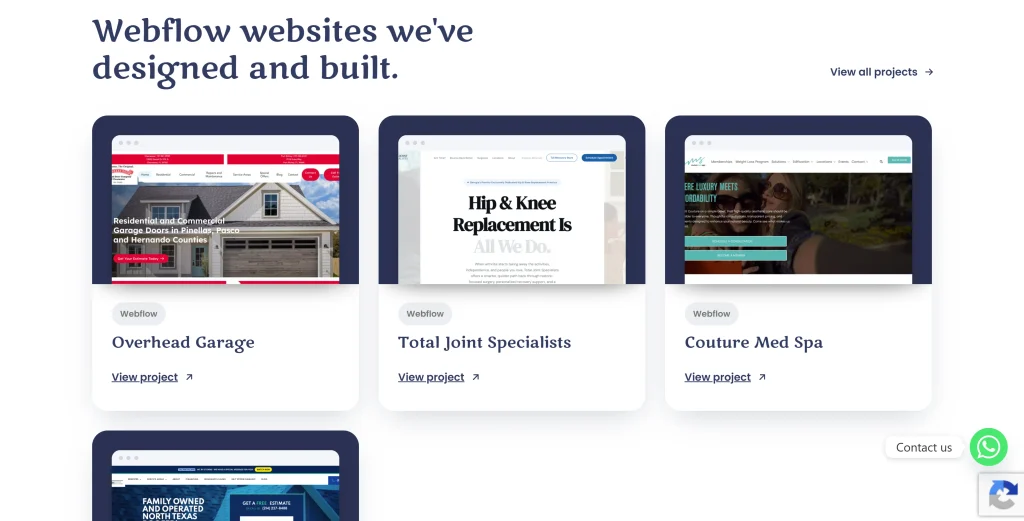
| Live work | Webflow sites we’ve built, including Overhead Garage and Couture Med Spa |
| SEO and redirects | Webflow SEO setup: 301 redirects for every changed or migrated URL, JSON-LD schema, sitemap, GA4 and Search Console |
| Speed and accessibility | Responsive WebP and AVIF images, lazy loading, alt text and semantic heading structure |
| Integrations | HubSpot, Zapier, Memberstack, GA4 and Google Tag Manager |
| Ownership | The site lives in your Webflow Workspace, the site plan is billed to you, and full ownership is handed over at launch |
| Process | You approve a prototype before the build; updates are tested on the webflow.io staging domain first |
| Support | One month of maintenance included with every build, then cancel anytime |
What to take into every call
The right Webflow developer can prove each claim. Use the 10 checks to compare candidates side by side:
- Check evidence, not badges.
- Get ownership and billing terms in writing.
- Require a redirect map for any migration.
- Test speed and accessibility on their live sites.
Questions about this guide? Contact us. If you’d like Zeireed on your shortlist, book a free Webflow consultation and we’ll give you a timeline and a fixed quote.

Join the conversation
No comments yet — share a question or your own experience. Your email stays private.