


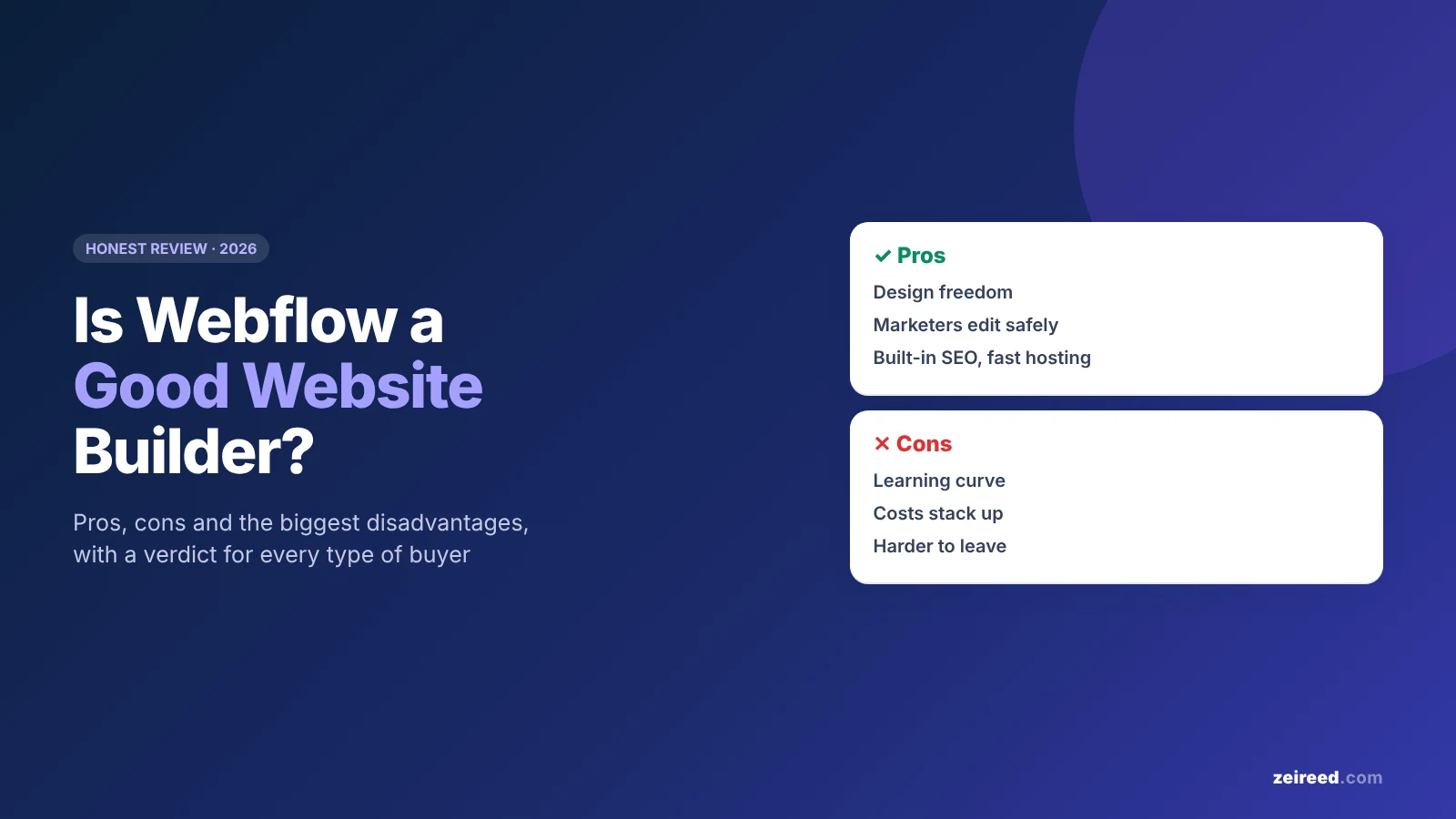
Webflow divides opinion. Some users call it the best website builder they have ever used. Others call it clunky, expensive and hard to learn. Both groups are right, because whether Webflow is a good website builder depends almost entirely on who you are and what you are building.
This review gives you a straight answer to “is Webflow a good website builder?” with current 2026 pricing and limits, the real pros and cons, the biggest disadvantages ranked by impact, and a clear verdict for each type of buyer. If you are new to the platform, start with our explainer on what Webflow is and how it works.
Short verdict: Yes, Webflow is a good website builder for custom-designed marketing websites that a team updates often, such as B2B, SaaS and content-led sites. It is not the best choice if you run a large online store, want the cheapest and quickest DIY option, or need full ownership of your code and hosting.
A note on bias: Zeireed builds websites on Webflow, WordPress, Duda and Shopify. We recommend whichever platform fits the project, so we have no reason to oversell any of them.
What Makes a Website Builder “Good”?
“Good” means different things to different buyers, so we scored Webflow on eight criteria that matter for most business websites:
- Design control: can you build exactly what you designed?
- Content editing: can non-technical people update the site safely?
- SEO controls: can you manage titles, URLs, redirects and structured data?
- Speed and security: is the site fast and safe without constant maintenance?
- Ease of use: how long does it take to become productive?
- Scalability: does it cope as your content, traffic and team grow?
- Total cost: what do you really pay each year?
- Ability to leave: how hard is it to move to another platform later?
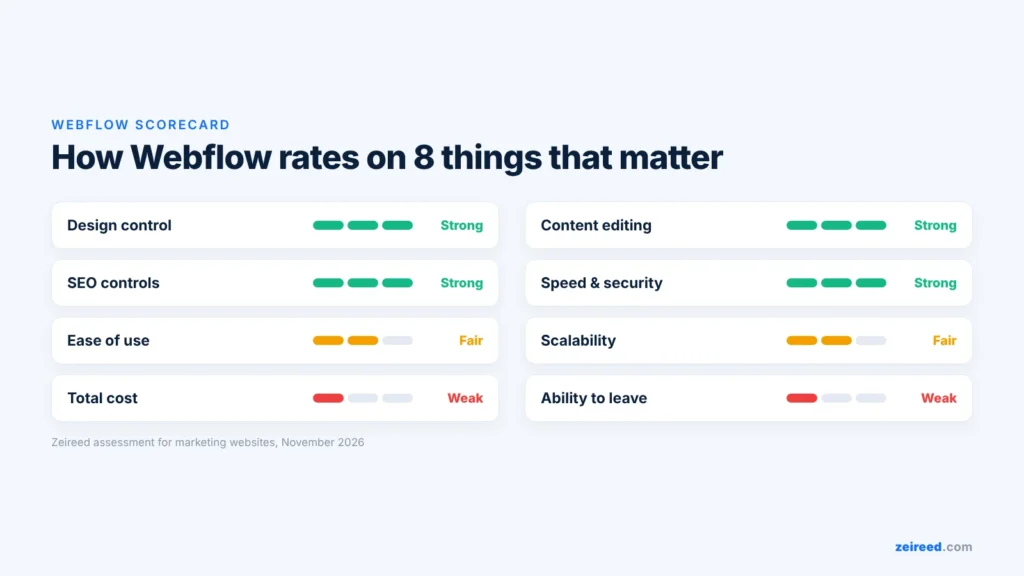
Webflow is strong on the first four, fair on ease of use and scalability, and weak on total cost and ability to leave. The rest of this article explains why.
User reviews tell a similar story. Webflow holds an average of 4.4 out of 5 from 995 reviews on G2 and 4.5 out of 5 on Capterra. Reviewers most often praise its design freedom and clean output, and most often complain about the learning curve and price.
Webflow Pros: What It Does Well
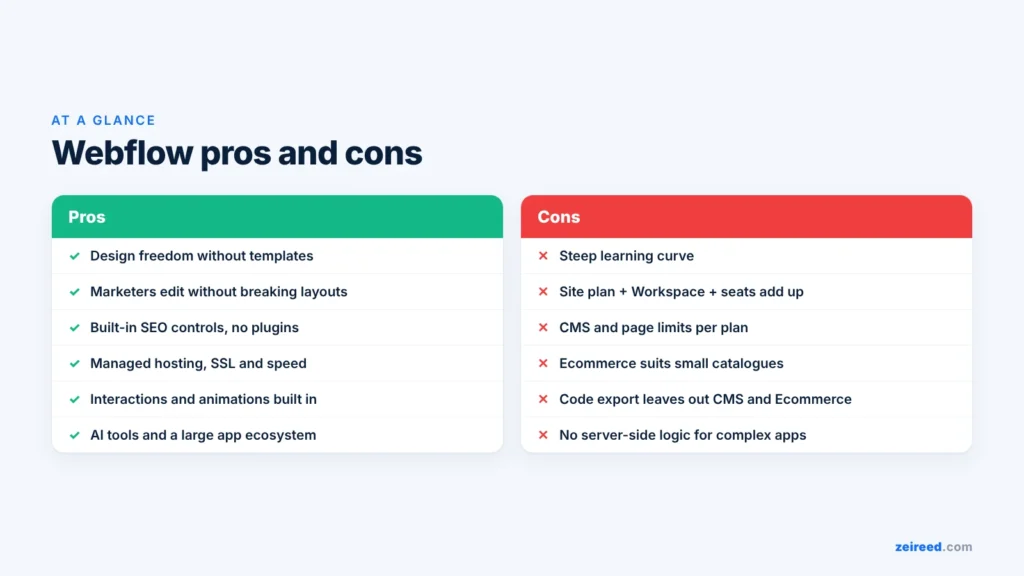
Design freedom without templates
Webflow’s Designer is a visual canvas that works like real web code. You control layout, spacing, typography and responsive behavior for every screen size, and Webflow writes clean HTML and CSS for you. You are not locked into a template’s structure, so a designer’s mockup can be built exactly as drawn. This is the main reason design-led brands choose Webflow over template builders such as Wix or Squarespace.
Marketers can edit without breaking the design
Once a site is built, content editors can update text, images and CMS items in the browser without touching the layout. Blog posts, case studies and team pages live in CMS Collections, so publishing a new article means filling in fields, not designing a page. For marketing teams that ship content every week, this removes the developer bottleneck.
Roles help here too. Designers work in the Designer, while content editors can work on cheaper Limited seats. That separation is what keeps a Webflow site looking consistent after months of edits by different people, something template builders and page builders often struggle with.
Built-in SEO controls
Webflow gives you title tags, meta descriptions, clean URL slugs, 301 redirects, an automatic sitemap, canonical tags and a schema markup field without any plugins. CMS templates can generate unique SEO titles for every item. We cover every setting in our guide on how to build an SEO-friendly website in Webflow.
Managed hosting, speed and security
Hosting is included and managed for you, with SSL and global content delivery. There are no plugins to update and no servers to patch, which removes the most common causes of hacked and slow websites. For small teams without a developer on call, that alone can justify the price.
One caveat: Webflow advertises very high uptime, but a formal uptime guarantee (an SLA) comes only with Enterprise plans. For most marketing sites that is fine, but regulated or mission-critical sites should check the terms.
Interactions and animations built in
Scroll effects, hover states and animated sections can be built visually, without JavaScript libraries. Used with restraint, they help a site feel polished and modern.
AI tools and a growing ecosystem
Webflow now includes an AI site builder, AI help for meta tags and schema, an Apps marketplace for integrations and Webflow University’s free courses. Read our take on Webflow’s AI website builder for what it can and cannot do yet.
Webflow Cons: Where It Falls Short
A steep learning curve
Webflow is often called no-code, but it is better described as visual development. You make the same decisions a front-end developer makes: boxes, classes, flexbox, breakpoints. Beginners can publish a simple page quickly, but building a clean, professional site takes weeks or months of practice. Our guide on how to use Webflow shows what the learning path looks like.
The learning curve also shows up later. Sites built without a clear class naming system become hard to change, and a messy build can slow down every future update. It is a common problem when a new team inherits an existing Webflow site.
Pricing stacks up
Webflow charges per site and per team. A typical business pays for a site plan, often a Workspace plan, extra seats for editors, and sometimes add-ons like Localization. Each is reasonable on its own, but together they cost more than many buyers expect. See the cost breakdown below.
CMS and page limits
Each plan has caps. The Basic site plan has no CMS at all, and the Premium plan allows up to 20,000 CMS items across 40 Collections, according to Webflow’s pricing page. That is plenty for most marketing sites, but large publishers, directories or programmatic SEO projects can outgrow it.
Ecommerce suits small catalogues
Webflow Ecommerce lets you design beautiful product and checkout pages, but it is built for smaller stores. The Standard plan allows 500 products, Plus allows 5,000 and Advanced allows 15,000. The Standard plan also adds a 2% transaction fee on top of payment processing fees, which Plus and Advanced remove. Large or complex stores are usually better served by a commerce-first platform such as Shopify.
Leaving is harder than it looks
You can export your site’s HTML, CSS, JavaScript and assets on a paid Workspace plan. But according to Webflow’s help center, CMS content, User Accounts, Ecommerce content and localized pages are not included in exported code. CMS items can be exported separately as CSV files, but your blog, forms and store all need rebuilding on the new platform.
No server-side logic for complex apps
Webflow is built for websites, not web applications. Features like complex logins, custom databases or heavy business logic need third-party tools, custom code or Webflow Cloud, its newer hosting option for developer-built apps. If your “website” is really a product, plan for a separate app stack.
The Biggest Disadvantages of Webflow, Ranked
Not every disadvantage matters equally. Here is how we rank them by real-world impact, with a workaround for each.
| Rank | Disadvantage | Who it hurts most | Workaround |
| 1 | Total cost adds up | Small businesses and teams with many editors | Start on Basic or Premium only, use Limited seats for editors, add Workspace and add-ons only when needed |
| 2 | Steep learning curve | DIY founders and non-designers | Use a well-built template, take Webflow University courses, or have a developer build it and train your team |
| 3 | Lock-in | Companies that may change platform | Export CMS content to CSV regularly and keep your design system documented |
| 4 | Ecommerce limits | Stores with large catalogues or complex checkout | Use Shopify for the store and Webflow for the marketing site |
| 5 | CMS limits | Large publishers and directories | Plan Collections carefully, or move to Enterprise or a headless CMS |
For most marketing websites, only the first two really matter. Lock-in, ecommerce and CMS limits are serious for specific projects, but many companies never hit them.
Is Webflow Good for You? Verdict by Buyer Type
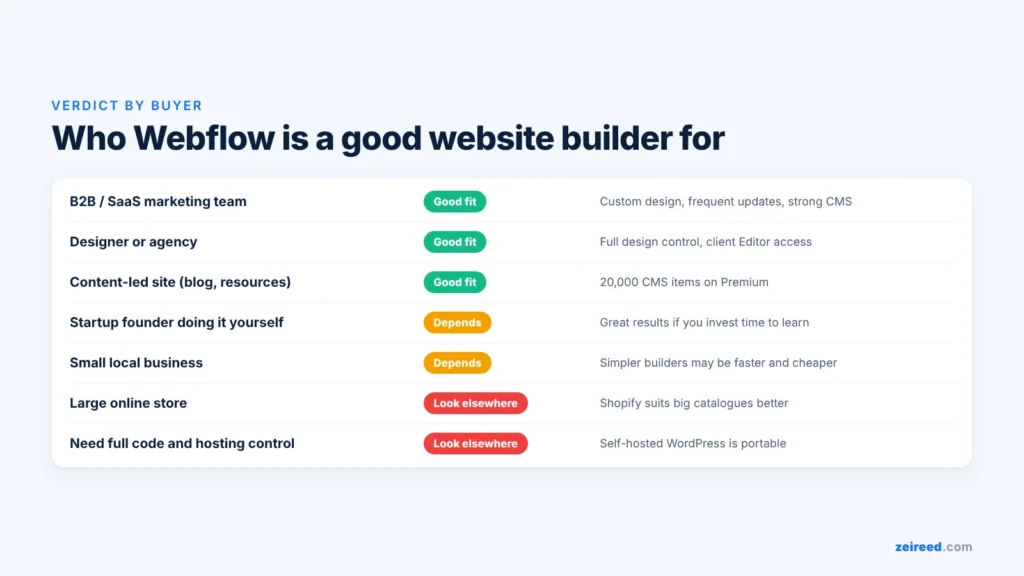
| Buyer | Verdict | Why | If not Webflow |
| B2B or SaaS marketing team | Good fit | Custom design, frequent updates, strong CMS and SEO controls | — |
| Designer or agency | Good fit | Full design control and safe client editing | Duda for many similar client sites |
| Content-led site (blog, resources) | Good fit | Up to 20,000 CMS items on Premium | WordPress for very large archives |
| Startup founder building it yourself | Depends | Excellent results if you invest time to learn | Framer, Wix or a Webflow template |
| Small local business | Depends | Simpler builders may be faster and cheaper | Squarespace, Wix or Duda |
| Large online store | Look elsewhere | Product limits and fees on the entry plan | Shopify |
| Needs full code and hosting control | Look elsewhere | Closed platform, partial code export | Self-hosted WordPress |
| Enterprise with complex needs | Depends | Strong on Enterprise, but costs and governance need planning | Headless CMS with a custom front end |
If Webflow is a good fit and you plan to hire help, our checklist on how to choose a Webflow developer shows what to ask before you sign.
Quick Self-Check: Is Webflow a Good Website Builder for Your Project?
Answer these questions honestly. If you say yes to most of the first five and no to the last three, Webflow is likely a strong fit.
- Does a distinctive, custom design matter to how you win customers?
- Will your marketing team publish or update content every week or month?
- Do you want to avoid managing plugins, hosting and security updates?
- Is your site mainly a marketing site, blog or resource hub rather than an app?
- Can you invest time to learn Webflow, or budget for a developer to build it?
- Do you need to sell thousands of products or run complex checkout flows?
- Do you need full ownership of your code and the freedom to host anywhere?
- Is the lowest possible monthly cost your top priority?
What Webflow Really Costs
Webflow’s site plans look affordable, but the true cost depends on how many layers your team needs. Prices below are billed yearly in USD, from Webflow’s pricing page in November 2026.
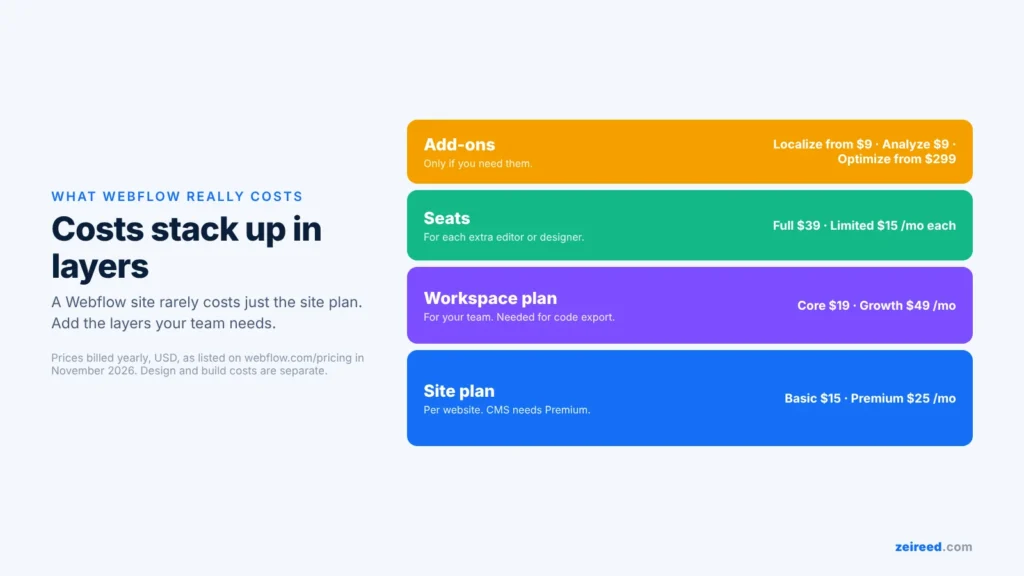
| Cost layer | Price (billed yearly) | When you need it |
| Site plan: Basic | $15/mo | Simple sites without a CMS, up to 300 static pages |
| Site plan: Premium | $25/mo | Sites with a blog or CMS content |
| Ecommerce plans | $29, $74 or $212/mo | Online stores (Standard, Plus, Advanced) |
| Workspace plan | Core $19/mo, Growth $49/mo | Team collaboration and code export |
| Extra seats | Full $39/mo, Limited $15/mo each | Each additional designer or editor |
| Add-ons | Localize from $9/mo, Analyze $9/mo, Optimize from $299/mo | Multiple languages, analytics, A/B testing |
For example, a small marketing team with a blog, one Workspace plan and two editors could pay roughly $25 + $19 + 2 × $15 = $74 a month before any add-ons. Design and development costs are separate again.
How to keep Webflow costs under control
- Start small. Choose Basic if you do not need a blog or CMS, and move to Premium only when you do.
- Pay yearly. The prices above are billed yearly; monthly billing costs more.
- Use Limited seats for editors. Content editors rarely need Full seats.
- Skip add-ons until you need them. Localization, Analyze and Optimize are optional.
- Invest in a clean build. A well-structured site is cheaper to update, which matters more over three years than the monthly plan price.
Webflow vs WordPress, Wix and Squarespace
Webflow sits between template builders and fully open platforms. Here is how they compare at a glance:
| Platform | Design control | Ease of use | Maintenance | Ownership | Best for |
| Webflow | Very high | Moderate | Low (managed) | Limited export | Custom marketing sites |
| WordPress | High with the right theme | Moderate | High (plugins, hosting) | Full (open source) | Large content sites, full control |
| Wix | Medium | Easy | Low (managed) | Low | Quick small-business sites |
| Squarespace | Medium | Easy | Low (managed) | Low | Portfolios and simple sites |
If you are moving an existing site to Webflow, our guide to Webflow migration covers timelines and costs.
Frequently Asked Questions
Is Webflow good for beginners?
Webflow is usable by beginners, but it is not the easiest builder. You can publish a simple page quickly, but building a professional site takes time because Webflow uses real web layout concepts. Beginners who want speed over control may prefer Wix or Squarespace.
Is Webflow worth the money?
For businesses that need a custom-designed site their marketing team can update, yes. The design control, managed hosting and lack of plugin maintenance often save more than the subscription costs. For a simple brochure site, cheaper builders can be better value.
Is Webflow good for SEO?
Yes. Webflow includes the main SEO controls without plugins: titles, meta descriptions, clean URLs, redirects, an automatic sitemap, canonical tags and schema markup. Rankings still depend on your content, structure and links.
What is the biggest disadvantage of Webflow?
For most businesses, it is total cost: a site plan, a Workspace plan, editor seats and add-ons add up. For DIY users, the learning curve is the bigger hurdle. For companies that may switch platforms later, lock-in matters most.
Can I move my site off Webflow later?
Yes, but plan for work. On a paid Workspace plan you can export static code, and you can export CMS items as CSV files. CMS pages, forms, ecommerce and localized pages need rebuilding on the new platform.
Is Webflow better than WordPress?
Neither is better for everyone. Webflow offers more design control out of the box and almost no maintenance. WordPress offers full ownership, a huge plugin library and the freedom to host anywhere. Choose Webflow for custom marketing sites and WordPress when you need maximum flexibility and control.
Final Verdict: Is Webflow a Good Website Builder?
Webflow is a good website builder, and for custom-designed marketing sites it is one of the best. It gives designers real control, lets marketers publish without developers, and removes most maintenance and security work. The trade-offs are a steeper learning curve, costs that stack up and a platform that is harder to leave than open-source alternatives. If those trade-offs fit your situation, Webflow is worth it. If you need a large store, the cheapest DIY option or full code ownership, look elsewhere.
Still unsure which platform fits your project? Book a consultation and we will recommend Webflow, WordPress, Duda or Shopify based on your goals. If Webflow is the right fit, explore our Webflow website development services.


Join the conversation
No comments yet — share a question or your own experience. Your email stays private.