


Type a few sentences about your business into Webflow, and a few minutes later you have a multi-page website with a color palette, typography, draft copy and its own style guide page. That part is real, and it is useful.
What the demo does not show is the distance between that first draft and a website that wins leads, ranks in search and keeps working as your business grows. This guide covers what Webflow’s AI website builder does today, where it stops, what it really costs, and how to tell when a professional Webflow developer is the better investment.
Quick answer: Webflow’s AI website builder is a strong way to get a structured, editable first draft of a new site. It is not a replacement for strategy, custom functionality, integrations, migrations or brand-level design. Use it alone for simple, low-stakes sites. Bring in a Webflow developer when the site is a core sales channel or needs anything beyond static pages and basic CMS content.
What Is Webflow’s AI Website Builder?
Webflow’s AI website builder (Webflow calls it the AI site builder) is a tool that generates a new, responsive, multi-page website from a text description. It proposes the page structure, designs each section, writes contextual copy, sets a theme and creates a style guide page. The result is a normal Webflow project that you keep editing in the Webflow Designer.
It sits inside Webflow AI, Webflow’s umbrella name for its AI features. As of November 2026, Webflow’s Help Center still labels the AI site builder as a beta.
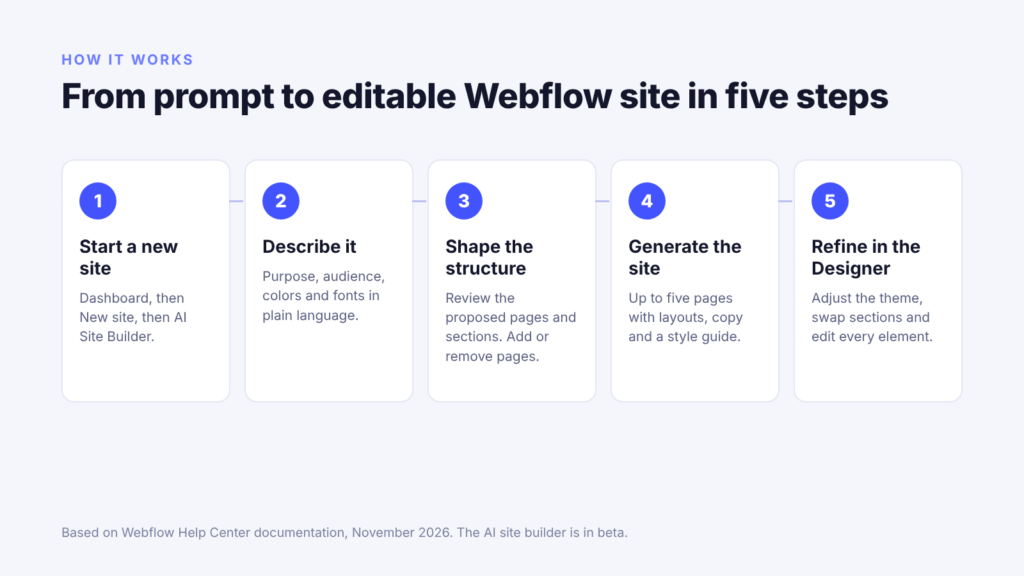
How it works, step by step
- In your Webflow Dashboard, click New site and choose AI Site Builder.
- Describe the site you want: what the business does, who it serves, and any preferences for colors or fonts.
- Review the proposed structure. The builder suggests pages and sections, and you can add, remove or reorder them.
- Click Generate site. Webflow creates full page designs with copy written for your business.
- Adjust the theme and sections, then continue in the Designer like any other Webflow project.
What sits under the hood
AI-generated sites are built on Flowkit, Webflow’s CSS framework of reusable utility classes, component patterns and design tokens. This matters more than it sounds. A site built on a consistent class system is far easier for a designer or developer to extend later than one built from random styles.
How it fits with the rest of Webflow AI
The site builder is only one part of Webflow AI. Once a site exists, other AI features can help with day-to-day work:
- AI Assistant for help: answers questions about using Webflow, drawn from the Help Center, inside the Designer. Limited to 100 questions every 31 days.
- Section design: generates new sections that match your site’s styles. Still in beta and limited to AI-built sites and a small number of free templates.
- Copy generation: writes and refines copy such as meta titles, meta descriptions and blog posts. Requires a paid Workspace or Site plan.
- CMS item generation: creates Collection items one at a time or in bulk. Not available on the Basic Site plan.
- SEO, AEO and accessibility audits: finds missing alt text, meta titles, meta descriptions and schema markup, then drafts fixes. Requires a paid plan.
- AI code components: generates custom code components from a prompt.
- Webflow MCP server: connects Webflow to outside AI tools, such as Claude, to manage sites through conversation.
What Webflow’s AI Builder Can Do: A Feature Evaluation
Editor note: The brief’s heading was “We Tested Webflow’s AI Builder: Here’s What It Can Do”. No hands-on test evidence was available, so this section is written as a feature evaluation from Webflow’s official documentation. If the Zeireed team runs a test, restore the original heading and add the prompt used, time taken, page count, screenshots and an honest verdict.
Everything in the table below comes from Webflow’s own Help Center. Practical expectations that have not been verified are listed separately underneath.
Verified capabilities
| Capability | What Webflow documents |
| Multi-page generation | Generates up to five pages from your prompt. More pages can be added after the site is created. |
| Editable site structure | Proposes pages and sections before generating, so you can shape the sitemap first. |
| Theme controls | A theme picker updates colors, animations, typography, sections, images, buttons, forms, cards, spacing and border radius across every generated page. |
| Section editing | Sections can be added, replaced, moved, restyled or deleted on the canvas. |
| Style guide | A style guide page is created automatically and does not count toward page limits. |
| New pages later | Additional pages can be generated with AI from the Pages panel and match the existing design. |
| Full Designer access | The output is a standard Webflow project, editable element by element in the Designer. |
| CMS content | Webflow AI can generate CMS Collection items if your site uses the CMS. |
Realistic use cases
- A local service business that needs a clean four or five page site (home, services, about, contact) quickly and on a small budget.
- A startup testing an idea that wants a credible launch page before investing in a full brand.
- A marketing team sketching the structure of a campaign microsite to review before design work begins.
- A designer or developer who wants a structured starting point instead of a blank canvas.
Illustrative example (not a test result): a physiotherapy clinic might describe its services, location and calm, clinical tone. You would expect a proposed sitemap with home, services, about and contact pages, a soft color palette and copy describing appointments. The clinic would still need to replace stock imagery, check every claim in the copy, add its booking system and set up local SEO.
What to expect (not verified by testing)
- Draft copy is a starting point. It describes your business in general terms and needs your real offers, proof points and tone of voice.
- Imagery comes from image packs. Webflow notes that changing the image pack only affects new pages and sections, so plan to swap images manually.
- Layouts follow common patterns. That makes them clean and usable, but rarely distinctive.
Where Webflow’s AI Website Builder Falls Short
The limits below are the ones most likely to affect a business site. Most come straight from Webflow’s documentation.
It only works on brand-new sites
Webflow states that the AI site builder cannot be applied to an existing site that was not originally built with it. If you are redesigning a current Webflow site or moving from WordPress, Wix or Squarespace, the builder will not rework what you already have. It also will not handle content migration or redirects.
The free plan keeps only two pages
The builder generates up to five pages, but on the free Starter plan you can keep only two static pages. Webflow deletes the pages you do not select unless you upgrade to a paid plan.
Some AI editing tools are still narrow
AI section design is in beta and only works on AI-built sites and a few free templates. Webflow also notes that you cannot share Libraries from a site created with the AI site builder, which matters for teams that reuse components across several sites.
Complex functionality still needs code or specialist setup
Webflow’s AI code components cannot add databases, API secret management or authentication. Requests over 256 KB also fail. That rules out AI-only builds for member areas, client portals, gated content, custom calculators that store data, and similar features. Those need a developer, a third-party tool, or both.
Editor note: Webflow’s AI site builder documentation does not say whether it generates Ecommerce stores or product pages. Do not claim either way until verified.
Integrations are not set up for you
Webflow’s AI documentation does not describe connecting CRMs, marketing automation, analytics, cookie consent or booking tools. Plan on configuring these yourself or with a developer, and testing that form data actually reaches your CRM.
SEO is a starting point, not a strategy
Webflow gives you solid SEO controls, and its AI can draft meta titles, descriptions, alt text and schema on paid plans. What it does not do is choose your target keywords, plan a site architecture around search demand, build internal links, or protect your existing rankings during a migration with 301 redirects. Those decisions decide whether a site gets found.
Brand and design depth
The theme system keeps everything consistent, which is a real strength. But a theme picker cannot translate a brand strategy into a distinctive layout, custom illustrations or purposeful interactions. Businesses competing on brand usually need a designer.
Scalability and AI credits
The builder does not plan your CMS structure, such as how blog posts, authors, case studies and service pages should reference each other. A poor structure is painful to fix after hundreds of items exist. On top of that, many AI features draw on a shared pool of AI credits. Webflow does not publish a cost per action, and credit-based features stop working when the pool runs out until it resets or you buy more.
AI-Assisted Website Building vs Professional Webflow Development
The choice is less about AI versus humans and more about how much of the work beyond the first draft you can do well yourself.
[IMAGE 3: webflow-ai-vs-developer.png | Alt text: ]
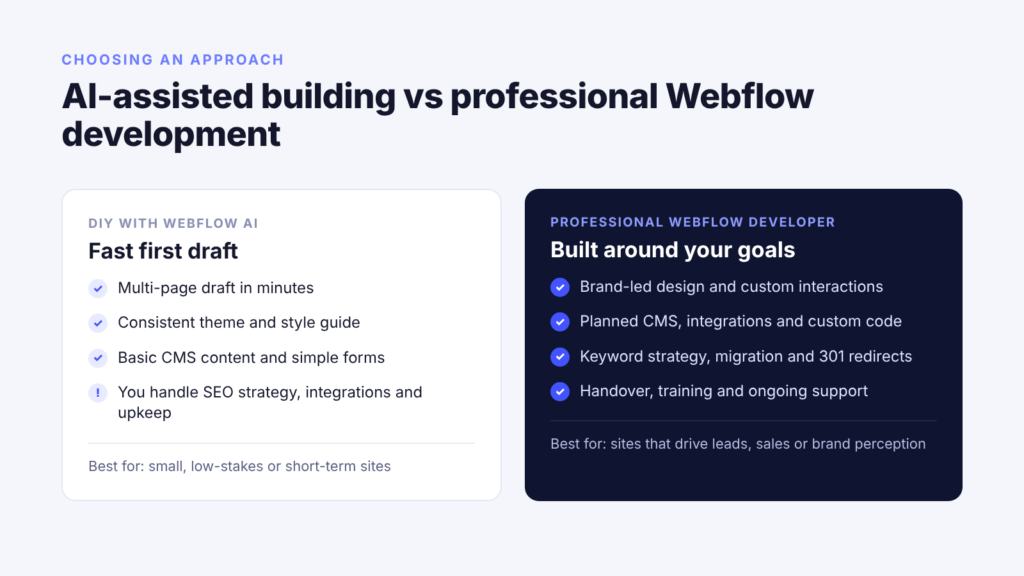
| Factor | Webflow AI builder (DIY) | Professional Webflow development |
| Speed to first draft | Minutes | Usually weeks, depending on scope |
| Design quality | Clean, consistent, template-like | Built around your brand, audience and conversion goals |
| Flexibility | Full Designer access, if you know how to use it | Anything Webflow supports, plus custom code |
| Functionality | Static pages, basic CMS content, simple forms | Integrations, memberships, custom logic, complex CMS |
| SEO | Meta tags, alt text and schema drafts | Keyword strategy, architecture, internal links, migration redirects |
| Maintenance | You own every update and fix | Handover training, documentation or an ongoing support plan |
| Scalability | Fine for small sites | CMS and class structure planned for growth |
| Best fit | Small, low-stakes or temporary sites | Sites that drive leads, sales or brand perception |
The middle path
You do not have to pick one. Because the AI output is a standard Webflow project on Flowkit, it can serve as a starting point that a developer refines. Generating a draft first can also help you show a developer what you like, which makes briefs clearer.
Webflow AI Builder vs Professional Development: Cost Comparison
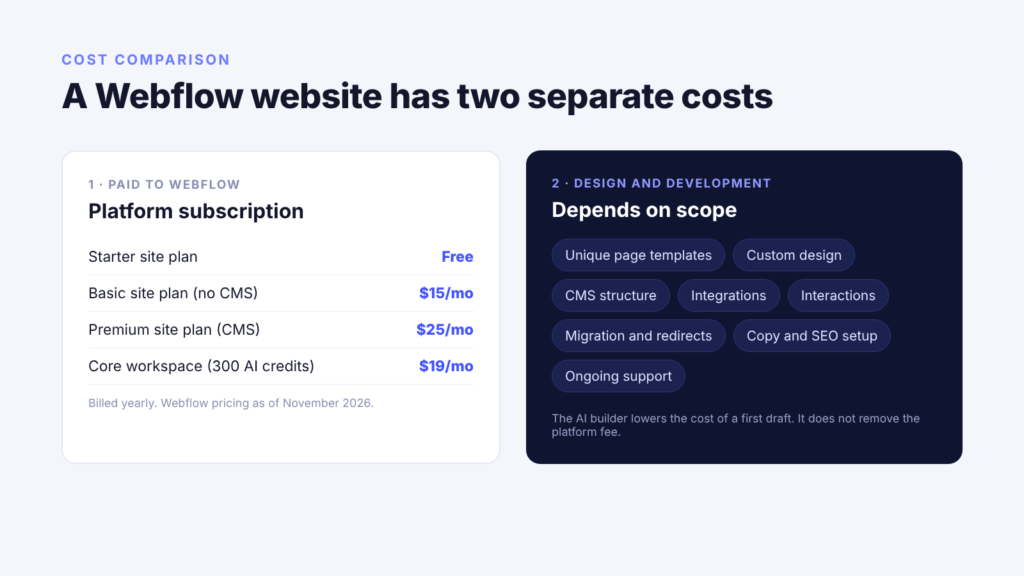
A Webflow website has two separate costs: the subscription you pay Webflow, and the cost of the design and development work. The AI builder reduces the second, not the first.
[IMAGE 4: webflow-ai-cost-comparison.png | Alt text: ]
Platform costs (verified 5 November 2026)
A Site plan pays for publishing and hosting one website on a custom domain. Webflow changed its plans on 13 May 2026, merging the old CMS and Business plans into a single Premium plan.
| Site plan | Billed yearly | Billed monthly | Key limits |
| Starter | Free | Free | webflow.io address, 2 static pages |
| Basic | $15/mo | $25/mo | Custom domain, 300 static pages, no CMS |
| Premium | $25/mo | $39/mo | Adds the CMS: 20,000 items in 40 Collections |
A Workspace plan covers building, staging and team access, and it is where AI credits live. Credits are shared across the Workspace and reset monthly on self-serve plans.
| Workspace plan | Price (billed yearly) | AI credits included |
| Starter | Free | 200 per month |
| Core | $19/mo | 300 per month |
| Growth | [Editor: verify on webflow.com/pricing] | 400 per month |
| AI credit add-on | $20/mo yearly or $25/mo monthly | 2,000 per month, up to 15 add-ons |
Editor note: Confirm the Growth Workspace price, seat prices, Ecommerce plan prices and the Team plan price on the live pricing page before publishing. Secondary sources list Growth at $49/mo and Team at $2,500/mo on an annual contract, but these were not confirmed on an official page.
Existing sites move to the new pricing at their next renewal or billable change on or after 29 June 2026, or on or after 16 November 2026 for sites in Freelancer or Agency Workspaces.
Which features use AI credits
Webflow confirms that AI help questions do not use credits and that creating or editing AI code components does. Credit use is dynamic, with no published rate card, and more complex tasks use more.
Editor note: Several 2026 reviews report that site generation and section design do not use credits, while copy, CMS items, SEO and AEO improvements, code components and AEO agents do. Check Webflow’s AI credits help article before stating this as fact.
Professional development costs
Development fees depend on scope, not on the platform. The biggest cost drivers are:
- The number of unique page templates
- Custom design versus adapting a template
- CMS structure and the number of Collections
- Integrations such as CRM, marketing automation, booking or memberships
- Custom interactions and animations
- Content migration, URL mapping and 301 redirects
- Copywriting and SEO setup
- Ongoing maintenance or support
A simple platform cost example
A small brochure site on the Basic plan billed yearly costs $180 a year in Webflow fees. A content site with a blog on Premium billed yearly costs $300 a year. Adding a Core Workspace for staging and extra AI credits adds $228 a year. With DIY, the main extra cost is your own time, including learning the Webflow Designer.
When Should You Hire a Professional Webflow Developer?
The AI builder alone is usually enough for a simple site you are happy to maintain yourself. A Webflow developer adds more value than they cost in these situations:
- You are redesigning or migrating an existing site. The AI builder cannot work on existing sites, and a migration without redirects can lose rankings you spent years earning.
- The website is a primary source of leads or sales. Conversion-focused layout, messaging and tracking pay for themselves quickly.
- You need a structured CMS. Blogs, case studies, team pages, locations or resources that reference each other need planning before content goes in.
- You need integrations or custom logic. CRM forms, gated content, member areas, calculators or third-party apps.
- Your brand has to stand out. Custom design, illustration and interactions that a theme picker cannot produce.
- You need multiple languages. Webflow Localize setup and localized SEO take careful configuration.
- You have accessibility or compliance requirements. AI audits help, but a human review is still needed.
- Your team does not have time to learn Webflow. The Designer is powerful but has a real learning curve.
Before you hire, ask to see live Webflow sites the developer has built, how they handle SEO and redirects, and what happens after launch.
Get a Professional Webflow Website Built
Webflow’s AI builder has lowered the cost of a first draft. What it has not changed is the work that makes a website perform: understanding your customers, planning content around search demand, building a CMS that scales, connecting the tools your sales team relies on, and launching without losing existing traffic.
That is where an experienced Webflow developer earns their fee. At Zeireed, we [Editor: add Zeireed’s real Webflow services, credentials, partner status and one or two case studies; do not invent any]. If you already have an AI-generated draft, bring it along. We can review it, keep what works and build from there.
[Book a free Webflow consultation] to talk through your goals, timeline and budget.
Frequently Asked Questions
Is Webflow’s AI website builder free?
You can use it on the free Starter plan, but you can only keep two static pages and publish on a webflow.io address. Keeping more pages and using a custom domain needs a paid plan, starting with Basic at $15 a month billed yearly. Webflow also says the builder is in beta and may carry a cost when it becomes generally available.
How many pages can Webflow’s AI site builder create?
It generates up to five pages from your first prompt. You can generate more pages afterwards from the Pages panel.
Can I use Webflow AI to redesign my existing website?
No. Webflow states that the AI site builder cannot be applied to a site that was not originally built with it. Redesigns and migrations from other platforms need manual work or a developer.
Can I edit a site made with the Webflow AI website builder?
Yes. The output is a standard Webflow project, so you can edit every element, class and page in the Webflow Designer.
Does Webflow AI handle SEO for me?
Partly. On paid plans it can draft meta titles, meta descriptions, alt text and schema markup. It does not do keyword research, site architecture, internal linking or migration redirects.
What are Webflow AI credits?
AI credits are the unit Webflow uses to meter some AI features. Every Workspace plan includes credits, from 200 a month on Starter to 400 a month on Growth, and you can buy add-ons of 2,000 credits. Features that use credits stop working when your balance runs out until it resets.
Can the Webflow AI website builder replace a Webflow developer?
For a simple, low-stakes site, it can replace much of the early build. For migrations, integrations, structured CMS content, custom features or brand-led design, a Webflow developer is still the better choice.
How is the AI site builder different from the Webflow AI Assistant?
The AI site builder creates a new site from a prompt. The AI Assistant works inside the Designer on an existing project, answering questions, designing sections and helping with copy and content.

Join the conversation
No comments yet — share a question or your own experience. Your email stays private.