


A professional Webflow migration covers three jobs. It rebuilds your design in Webflow, moves your content into the Webflow CMS, and moves your SEO with a full 301 redirect map. Webflow’s own migration guidance splits the work into three phases: plan, build and refine, then ship and QA (Webflow University, retrieved 2026-11-04). How long it takes depends on the size of the site, how much content needs cleaning, and how quickly decisions are made. The price follows the same complexity, more than the page count.
This guide explains what should be in a migration quote, what happens in each phase and what sets the timeline, what makes a migration expensive, how much your own team has to do, and how rankings are protected.
Key Takeaways
- A professional Webflow migration includes an audit and URL inventory, a design rebuild, content import into CMS Collections, a 301 redirect map, QA on staging, the DNS cutover and handover to your own Workspace.
- Webflow’s own model has three phases: plan, build and refine, then ship and QA. Content decisions, not page count, set the pace.
- Webflow’s tools move content, not designs. The approved WP to Webflow app imports posts, categories, tags and images. Designs are rebuilt, and Webflow has no built-in Framer import.
- Expect rankings to fluctuate while Google recrawls the site. Google says search visibility “may fluctuate temporarily during the move”, and a complete, tested redirect map is what limits the risk of a lasting drop.
What does a professional Webflow migration include?
Compare quotes by scope, not price. “Migration” can mean anything from copying pages by hand to a full rebuild with an SEO plan, and two quotes are only comparable when they list the same deliverables. This is the scope Zeireed works to in its Webflow migration services.
| Usually included | Often an extra | Usually not included |
|---|---|---|
| Audit of the current site and a full URL inventory | A redesign instead of a 1:1 rebuild | Writing content you haven’t supplied |
| Content model: which CMS Collections and fields you need | New pages or new copy | Third-party tool subscriptions |
| Design rebuilt in Webflow with a reusable style system | Complex interactions and animation | Closing the account on the old platform |
| Content imported into the CMS | Multi-language sites | |
| Forms, analytics and integrations reconnected | Ecommerce | |
| Meta titles, descriptions and alt text carried over | ||
| A URL-by-URL 301 redirect map | ||
| QA on the staging site | ||
| DNS cutover and launch checks | ||
| Training for your editors | ||
| Handover of the site to your Webflow Workspace |
Handover is the deliverable most often left vague. Since August 2025, Webflow has let agencies transfer a site with an active plan to the client’s Workspace with zero downtime, and billing moves to the client (Webflow, retrieved 2026-11-04). Ask for it in writing.
If you’re still choosing who to hire, our guide on how to choose a Webflow developer lists the questions to ask before you sign.
How long does a Webflow migration take?
There is no fixed timeline. Webflow’s own guidance describes the phases but not their length, and duration depends on three things: how many unique templates the site has, how much content needs cleaning before import, and how quickly your team makes content decisions. Large CMS sites, redesigns and sites with many integrations take the longest.
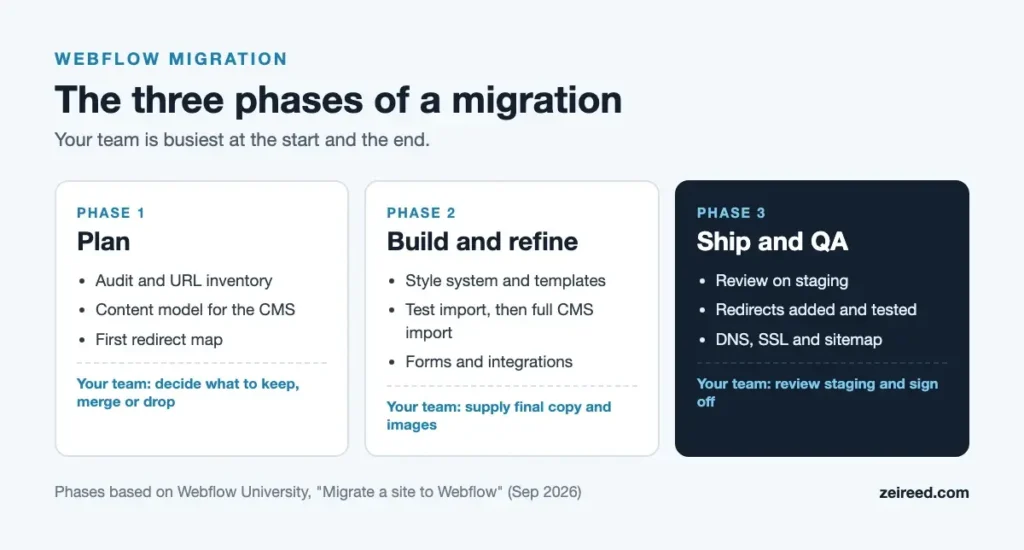
IMAGE: insert webflow-migration-phases.webp here.
Alt text: The three phases of a Webflow migration: plan, build and refine, then ship and QA, with the main tasks in each
Caption: The three phases of a Webflow migration, based on Webflow University’s migration guidance.
Plan
The plan phase produces the blueprint: an audit of the current site, an inventory of every URL, a content model for the Webflow CMS, and a first draft of the redirect map. Most of your team’s input happens here.
Build and refine
The developer builds a style system and page templates, then imports content. Webflow’s guidance is to test a small sample first, because image paths must be public URLs and rich text usually needs cleaning into simple HTML before it imports well (Webflow University, retrieved 2026-11-04).
Ship and QA
The site is reviewed on Webflow’s staging domain, redirects are added and tested, and the domain is connected. After launch, Webflow’s checklist is to confirm SSL and the canonical domain and to resubmit the sitemap in Search Console (Webflow University, retrieved 2026-11-04).
Search engines then need time to catch up. Google says that for a small to medium-sized website, “a few weeks” is typical for most pages to move in its index (Google Search Central, retrieved 2026-11-04).
EDITOR NOTE: Highest-priority missing input. Add Zeireed’s typical duration for each phase from real project records (e.g. “Plan: X weeks for a 30-page site”). Do not add estimates that are not based on Zeireed’s own projects.
What makes a Webflow migration expensive?
The price of a migration follows its complexity. The biggest cost drivers are:
- Unique page templates. Ten different layouts take far longer than fifty pages that share three templates.
- Content volume and cleanup. Old content often carries broken formatting, shortcodes or images hosted in odd places, and all of it has to be cleaned before import.
- A 1:1 rebuild vs a redesign. A redesign adds discovery, design rounds and approvals.
- Interactions and animation. These are rebuilt by hand in Webflow.
- Integrations and custom code. Examples are CRM forms, gated content, search and membership tools.
- Languages. Each locale adds content, QA and redirects.
- Number of URLs that change. More changed URLs means a longer redirect map and more testing.
The migration price is separate from what you pay Webflow. Since May 2026, Webflow’s Premium site plan, which combines the former CMS and Business plans, includes 20,000 CMS items and 40 Collections (Webflow, retrieved 2026-11-04). Large blogs and resource libraries should be checked against those limits during planning.
EDITOR NOTE: If Zeireed publishes “starting from” migration prices, add them here. Otherwise keep this section to cost drivers and point to the estimate CTA. Add a link to W3 (real cost of a Webflow website) when it is live.
What Webflow’s tools move, and what gets rebuilt
Webflow can import content, but every design is rebuilt. Knowing which parts can be automated explains most of the difference between quotes.
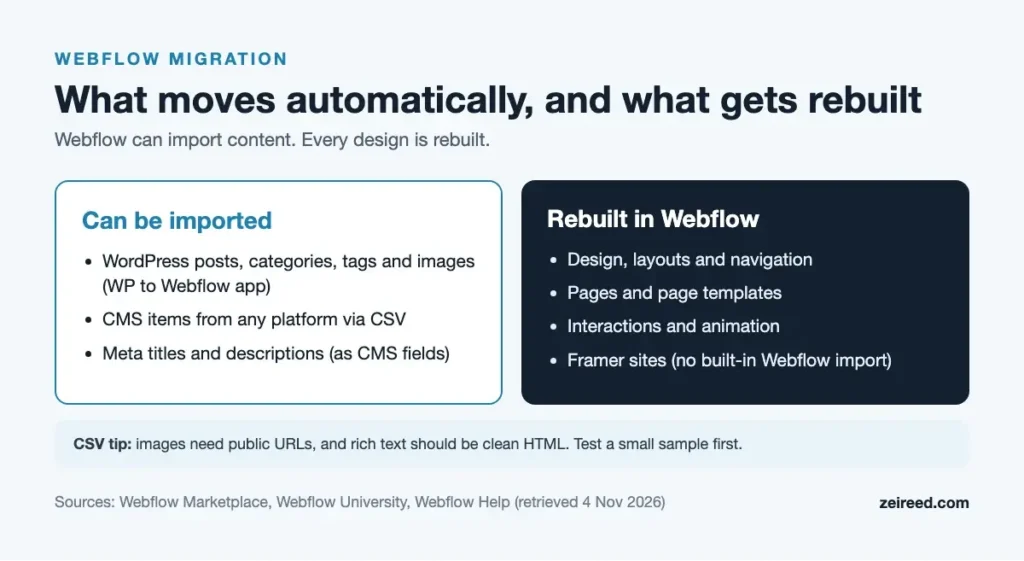
IMAGE: insert webflow-migration-moves-vs-rebuilt.webp here.
Alt text: What moves automatically to Webflow and what gets rebuilt: posts and CMS content can be imported, while designs, page layouts and interactions are rebuilt
Caption: What moves automatically and what gets rebuilt in a Webflow migration.
| Source or tool | What moves automatically | What gets rebuilt |
|---|---|---|
| WordPress with the WP to Webflow app | Posts, categories, tags and images | Pages, theme design, any custom fields the app doesn’t list |
| Any CMS via CSV import | CMS items, if rich text is clean HTML and images are public URLs | Page layouts and templates |
| Framer | No built-in Webflow import | The whole site, including interactions |
| Any platform | Content can be exported and imported | Design, navigation and interactions |
The WP to Webflow app is listed on Webflow’s marketplace as “Approved by Webflow”, which means Webflow reviewed it for quality but doesn’t endorse it. The listing says it’s free and requires a CMS plan; since May 2026, that means a site plan that includes the CMS, such as Premium (Webflow Marketplace, retrieved 2026-11-04).
For WordPress sites, there is also a phased option. Webflow’s own Webflow Pages plugin lets you choose which Webflow pages appear on which WordPress pages, so you can move a site section by section (WordPress.org, retrieved 2026-11-04). The plugin was last updated in November 2024 and hasn’t been tested with the last three major WordPress releases, so treat it as a short-term bridge, not a long-term setup.
How involved does your team need to be?
Your team’s busiest weeks are at the start and the end: content decisions during planning, and reviews during QA. In between, the developer does most of the work.
| Phase | Your team | The developer or agency |
|---|---|---|
| Plan | Confirm goals, approve the content model, decide what to keep, merge or drop | Audit, URL inventory, content model, redirect map |
| Build and refine | Supply final copy and images, answer questions within a day or two | Style system, templates, CMS import, integrations |
| Ship and QA | Review the staging site, test forms, sign off on redirects | Fixes, redirects, DNS cutover, launch checks |
| After launch | Publish in Webflow, report anything that looks wrong | Training, monitoring, handover to your Workspace |
Can your marketing team keep working during the rebuild?
Yes. Your current site stays live until the DNS cutover, so your team can keep publishing there until a short, agreed content freeze. Anything published after the content export is re-imported before launch.
Inside Webflow, the new site can be reviewed safely. Publishing to staging creates a live preview without affecting production (Webflow University, retrieved 2026-11-04). After launch, draft pages stay out of a publish until they’re ready, and visitors keep seeing the published version of a CMS item while edits stay in draft (Webflow University, retrieved 2026-11-04). Page branching, which lets you edit a copy of a live page, is listed as an Enterprise feature (Webflow University, retrieved 2026-11-04).
How does a professional migration protect your rankings?
A professional migration protects rankings with a URL-by-URL 301 redirect map, tested before and after launch. Google recommends permanent redirects and keeping them in place “generally at least 1 year” (Google Search Central, retrieved 2026-11-04).
A redirect plan should cover four things:
- Every changed URL has a redirect to its closest new equivalent, not to the home page. In Webflow, redirects can be added in the site’s SEO settings, including by importing a CSV of old and new paths (Webflow University).
- Redirects are tested on staging and again after launch. Google suggests the URL Inspection tool for single URLs and monitoring traffic on both old and new URLs (Google Search Central).
- The domain stays the same where possible. Google’s Change of Address tool is only needed when you move to a different domain or subdomain (Google Search Central).
- DNS is changed carefully. Webflow notes that its guided DNS setup can remove existing records, which can cause downtime, and that manual setup avoids this (Webflow University).
EDITOR NOTE: Webflow’s help center (help.webflow.com, “How do I set up redirects in Webflow?”) reportedly recommends a maximum of 1,000 redirects and supports wildcard rules. Recheck it in a browser, then add one sentence with the link if confirmed.
Even a well-run migration can cause a short dip. Google says search visibility “may fluctuate temporarily during the move” while it recrawls the site (Google Search Central). The redirect map limits the size and length of that dip, and it’s the deliverable to scrutinize most in any quote.
Platform notes: WordPress, Framer, Squarespace, Contentful, Drupal and more
WordPress
Blog posts, categories, tags and images can be moved with the WP to Webflow app, or exported and imported by CSV. Pages, theme layouts and custom fields are rebuilt. For a gradual move, the Webflow Pages plugin can serve selected Webflow pages on your WordPress domain.
Framer
EDITOR NOTE: Recheck Webflow’s help article “Migrate your site from Framer to Webflow” (help.webflow.com/hc/en-us/articles/48246102456083) in a browser and add it as an inline link here.
Webflow has no built-in Framer import, so the design is rebuilt and animations are recreated in Webflow’s Interactions panel. Content can be moved by exporting it and importing it into new Collections.
Squarespace
Content is exported, reshaped into CMS Collections and imported, and the design is rebuilt. Plan time for cleaning up blog formatting and image references.
Contentful
Contentful is a headless CMS, so the content model usually maps well to Webflow Collections. The main work is exporting entries to CSV, converting rich text to HTML and building the page templates.
Drupal
Drupal sites often have many content types and taxonomies. Most of the planning time goes into deciding which of them become Collections, which are merged, and how their URLs redirect.
Gatsby and Sitecore
Gatsby sites are usually rebuilt from their source content, often Markdown or a headless CMS. Sitecore sites need the same content-model and redirect planning as Drupal, usually at a larger scale.
EDITOR NOTE: Optional section. If Imtiaz supplies one real Zeireed migration (source platform, page and post count, weeks per phase, Search Console impressions 4 weeks before and after launch, and client permission), add an H2 here: “A Zeireed migration, start to finish”. Otherwise leave it out.
Webflow migration FAQ
Will I lose rankings when I migrate to Webflow?
A temporary fluctuation is common. Google says visibility may fluctuate while it recrawls a moved site. A complete 301 redirect map, tested before and after launch, limits the size and length of that dip.
Can we migrate in stages?
From WordPress, yes. Webflow’s Webflow Pages plugin lets you show selected Webflow pages on your WordPress domain, so sections can move one at a time. The plugin hasn’t been tested with recent WordPress releases, so use it as a short-term bridge.
Do I need a new domain?
No. Most migrations keep the same domain. Google’s Change of Address tool is only needed when you move to a different domain or subdomain.
Can WordPress move to Webflow automatically?
Partly. The WP to Webflow app imports posts, categories, tags and images. Pages, theme design and custom fields are rebuilt in Webflow.
Who owns the site after the migration?
You should. A professional migration ends with the site in your Webflow Workspace and the plan billed to you. Webflow supports this transfer with zero downtime.
Compare quotes by scope, not price
- Ask every provider for the same list of deliverables.
- Insist on a URL-by-URL redirect map.
- Plan a short content freeze with your marketing team.
- Expect rankings to fluctuate for a while, and rely on the redirect map to limit the risk of a lasting drop.
Zeireed handles migrations from WordPress, Squarespace and other platforms. Get a Webflow migration estimate and we’ll scope your site, timeline and redirect plan.

Join the conversation
No comments yet — share a question or your own experience. Your email stays private.